

Can a USB-to-FireWire Adapter Actually Connect Legacy Devices?
A passive USB-to-FireWire cable can waste money, leave valuable equipment undetected, or expose an older device to an incompatible power connection.
The reliable solution is to use a genuine FireWire host controller, a compatible PCIe FireWire card, a verified Thunderbolt adapter path, or an older computer with native IEEE 1394 support.
USB and FireWire both transfer digital data, but they use different communication, signaling, power, and driver systems. Changing the connector shape alone does not convert the protocol required by a camcorder, audio interface, external drive, or industrial device.
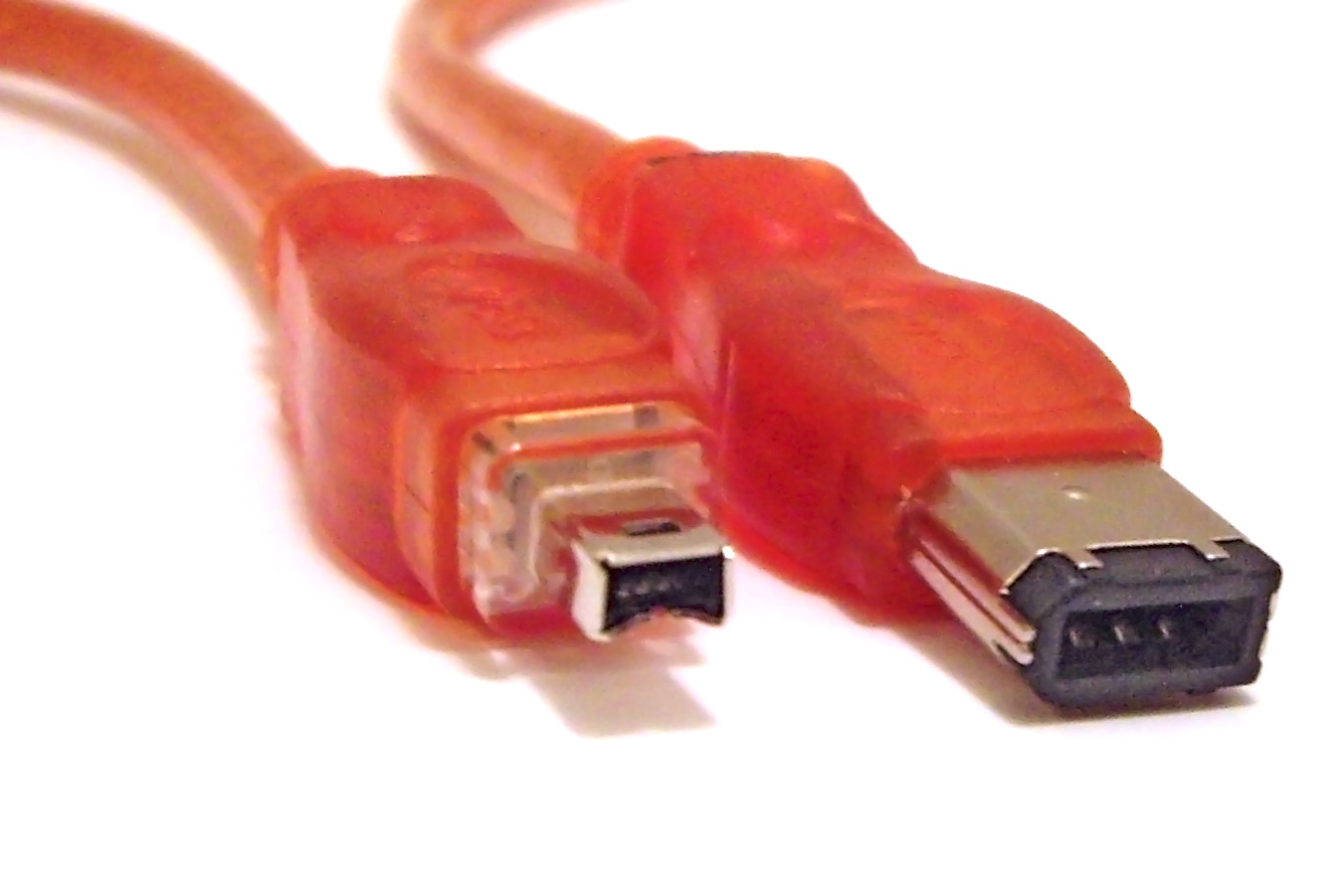
Wikimedia Commons, Mikkel Paulson.
Public domain.
Will a Simple USB-to-FireWire Cable Work?
Assuming that a connector-shaped adapter performs complete conversion can leave your camera, drive, or audio interface completely undetected.
Use only hardware that provides genuine IEEE 1394 support or active conversion specifically approved for the exact device and operating system.
Most low-cost USB-to-FireWire products are passive cables. They do not contain the controller, firmware, power management, or driver interface needed to create a real FireWire bus.
Direct answer: A passive USB-to-FireWire cable will not provide universal FireWire connectivity. Native FireWire hardware is usually the most dependable solution.
Why Are USB and FireWire Incompatible?
Connecting incompatible interfaces without proper conversion can cause driver failure, unstable communication, and incorrect device power.
Preserve the original FireWire communication path from the device to a compatible host controller.
USB normally uses a host-controlled architecture, while FireWire supports peer-to-peer communication and isochronous transfer for real-time audio and video.[1][2] These differences cannot be corrected by rearranging connector pins.
| Feature | USB | FireWire | Why It Matters |
|---|---|---|---|
| Communication | Host-controlled | Peer-to-peer capable | A passive cable cannot translate bus behavior |
| Real-time transfer | Managed by the USB host | Supports isochronous transfer | Important for DV video and multichannel audio |
| Power system | USB-defined power delivery | Different cable-power design | Incorrect power may prevent operation or damage equipment |
| Driver support | USB class or vendor driver | IEEE 1394 bus and device driver | The computer must recognize a real FireWire controller |
What Are the Reliable Alternatives?
Buying several passive adapters can cost more than installing the correct hardware while never producing a working connection.
Choose the solution according to the computer, FireWire device, operating system, and required workflow.
| Solution | Best Application | Main Check |
|---|---|---|
| PCIe FireWire card | Desktop computers | Chipset, driver, slot, and operating-system compatibility |
| Older FireWire computer | DV capture and file recovery | Working software, storage, and native FireWire port |
| Thunderbolt adapter path | Compatible Mac or Thunderbolt computer | The USB-C-shaped port must actually support Thunderbolt |
| Replacement modern device | Unsupported audio or industrial hardware | Software migration and required features |
A PCIe card adds a genuine IEEE 1394 host controller and is usually the most practical option for a desktop computer.
An older computer can also serve as a bridge. Connect the FireWire device to the older system, capture or copy the data, and then transfer the resulting files through Ethernet, Wi-Fi, or USB storage.
USB-C and Thunderbolt are not the same thing. USB-C describes the connector shape, while Thunderbolt is a separate interface that may use that connector. Apple provides official guidance for identifying compatible adapter paths.[3]
Which Solution Works Best for Each FireWire Device?
A method that works for one camcorder may still fail with an audio interface or external drive because each device has different driver and timing requirements.
Select the host hardware according to the device category and the value of the stored data.
FireWire camcorders: Use native FireWire or a verified PCIe controller to preserve digital DV transfer and camera control. A basic USB capture dongle usually captures analog video instead.
FireWire audio interfaces: Confirm the manufacturer’s final supported operating system, driver, and recommended controller chipset. Replacing the interface may be more reliable for long-term production.
FireWire hard drives: Check whether the enclosure also has USB. When files are irreplaceable, use a known-good native FireWire host or professional data-recovery service.
Industrial devices: Preserve the original workstation or use an engineered protocol bridge. Specialized hardware may depend on exact timing, drivers, and control software.
What Should You Check Before Buying Anything?
Buying by connector shape alone can leave you with the wrong cable, missing drivers, and another unusable adapter.
Identify the complete connection chain before selecting hardware.
- Device model: Record the complete camera, drive, interface, or instrument model.
- Connector type: Confirm 4-pin, 6-pin, or 9-pin FireWire.
- FireWire version: Identify FireWire 400 or FireWire 800.
- Computer port: Distinguish USB-C from Thunderbolt.
- Operating system: Confirm support before upgrading or buying adapters.
- Driver availability: Check the original equipment manufacturer.
- Power requirement: Determine whether the device needs bus power or an external supply.
Do not connect an unknown powered adapter to valuable legacy equipment. Verify the controller, pinout, power direction, and manufacturer documentation first.
Frequently Asked Questions
Misleading product listings can make a simple connector converter look like a complete protocol bridge.
Use these direct answers to reject unsuitable products before purchase.
Does a USB-to-FireWire cable work for MiniDV cameras?
Generally, no. A passive cable does not create the IEEE 1394 bus and camera-control functions required for native DV capture.
Can FireWire be converted directly to USB-C?
Not through connector wiring alone. The computer port, adapter chain, operating system, and device must all support the required interface.
Can a PCIe FireWire card work with a modern computer?
Possibly. Compatibility depends on the motherboard, controller chipset, driver, application, and FireWire device.
Will a USB video-capture card replace FireWire?
It may capture analog video, but it normally does not provide native DV transfer or FireWire camera control.
Can an older computer recover files from a FireWire drive?
Yes, when the drive, enclosure, file system, power supply, and native FireWire port remain functional.
Why is my FireWire controller detected but not the device?
The host card may be working while the device driver, application, cable, power supply, or operating system remains incompatible.
Final Expert Recommendation
A low-cost adapter becomes an expensive mistake when it changes only the plug and leaves the protocol, power, driver, and software requirements unresolved.
Preserve native FireWire communication wherever possible and test the complete hardware-and-software chain before trusting it with valuable recordings or data.
After 15 years working with automotive wiring harnesses, data cables, connectors, shielding, terminals, and signal-integrity failures, I have learned that a physical connection is not the same as a compatible electrical interface.
A reliable solution must control pin assignment, shielding, impedance, power delivery, protocol conversion, strain relief, and software compatibility—not merely make two different connectors fit together.
For a custom cable assembly, legacy-device integration review, connector sample, or technical quotation, provide the device model, port photographs, pinout, cable length, shielding requirement, operating environment, and expected quantity.
Technical Sources
1. USB Implementers Forum — USB 2.0 Specification.
View the USB-IF specification page.
2. Texas Instruments — IEEE 1394 FireWire Technical Information.
View the Texas Instruments FireWire guide.
3. Apple Support — Adapters for Thunderbolt or USB-C Ports.
View the Apple adapter guide.
4. Microsoft Learn — IEEE 1394 Driver Interfaces.
View the Microsoft IEEE 1394 documentation.

