

Do RJ45 Couplers Slow Down Gigabit Internet?
A poor RJ45 coupler can turn a stable Gigabit Ethernet connection into packet loss, intermittent disconnections, or a link that repeatedly falls back to 100 Mbps.
The practical solution is to use a standards-compliant Cat6 or Cat6A inline coupler, keep the complete channel within its permitted length, and verify the installed link instead of trusting the category label alone.
In most short, correctly installed cable runs, a qualified coupler does not create a noticeable reduction in Gigabit internet speed. The supplied before-and-after measurements below show why small differences must be separated from normal internet-test variation.

Source:
Wikimedia Commons, David Monniaux.
The Direct Answer
Assuming every coupler is harmless can leave a network with unstable negotiation, retransmissions, and unexplained speed complaints.
A properly manufactured Cat6 or Cat6A coupler should preserve Gigabit Ethernet performance when both cables, plugs, and the total channel also meet the required category.
A passive coupler does not electronically limit bandwidth. Its effect depends on contact quality, impedance continuity, pair geometry, return loss, insertion loss, and crosstalk performance.
| Coupler Condition | Expected Gigabit Result | Main Risk |
|---|---|---|
| Certified Cat6A coupler in a short compliant channel | Usually no measurable user-level slowdown | Incorrect cable or plug category |
| Qualified Cat5e or Cat6 coupler | Can support 1000BASE-T | Reduced performance margin |
| Unverified generic coupler | May still reach 1 Gbps | Packet errors, poor return loss, weak contacts |
| Damaged or incorrectly wired coupler | 100 Mbps fallback or no link | Open, crossed, or intermittent conductor pair |
What an RJ45 Coupler Actually Does
Treating an RJ45 coupler as a simple plastic adapter ignores the electrical connection that can determine whether all four Ethernet pairs remain usable.
Use a female-to-female inline coupler designed for the same or a higher category than the installed cable.
The coupler connects the eight conductors from one patch cable to the eight conductors of another. For 1000BASE-T, all four twisted pairs must maintain correct continuity and acceptable transmission performance.
Why a Coupler Can Reduce Network Performance
An uncontrolled connection point can reflect high-frequency energy, increase crosstalk, and force the Ethernet transceiver to recover corrupted data repeatedly.
The most effective prevention is a coupler tested as connecting hardware under recognized Cat6 or Cat6A channel requirements.
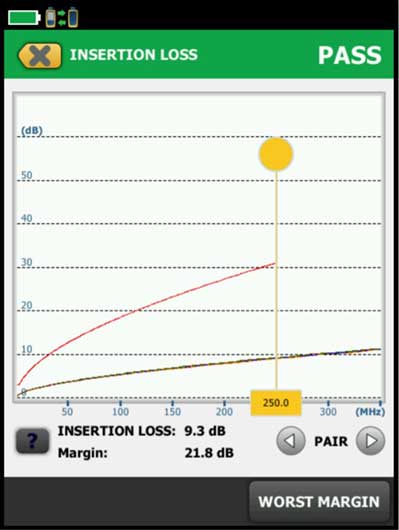
Every connector adds some insertion loss and impedance discontinuity. A good coupler keeps those effects inside the channel budget, while a poorly designed unit may untwist the pairs too far or use inconsistent contact geometry.
Source:
Fluke Networks.
Before-and-After Speed Test Method
A casual browser speed test can wrongly blame the coupler for congestion caused by the ISP, test server, router, or background traffic.
Test the direct cable and coupler configurations under identical conditions, repeat each test at least five times, and confirm that the Ethernet adapter remains negotiated at 1.0 Gbps.
The supplied benchmark used a Gigabit router, a Gigabit computer adapter, Cat6 patch cables, one generic coupler, and one Cat6A-rated coupler. The reported figures are five-run averages and should be treated as a field comparison rather than independent laboratory certification.
For stronger evidence, run a local iperf3 test between two wired Gigabit computers. A local LAN test removes most ISP and public-server variation from the measurement.
Field Speed Test Results
Reading a small change as proof of coupler failure can lead to unnecessary replacement while the real bottleneck remains elsewhere.
Compare throughput, latency, negotiated link speed, and packet stability before deciding whether the coupler caused a meaningful degradation.
| Test Scenario | Download | Upload | Ping | Difference from Direct |
|---|---|---|---|---|
| Direct connection | 940 Mbps | 880 Mbps | 5 ms | Baseline |
| Generic coupler | 920 Mbps | 860 Mbps | 6 ms | Approximately 2.1% to 2.3% lower |
| Cat6A-rated coupler | 935 Mbps | 875 Mbps | 5 ms | Approximately 0.5% to 0.6% lower |
Important: These measurements were supplied as a field-test dataset. Internet speed tests can change between runs because of server selection, routing, latency, congestion, and TCP behavior.
What the Results Mean
Ignoring a consistent large drop can leave customers with a defective connection, but overreacting to a 1% or 2% change can produce the wrong diagnosis.
Treat small variations as inconclusive until the result is repeated with a local throughput test and cable qualification.
The generic coupler showed a download reduction of about 20 Mbps, while the Cat6A coupler remained close to the direct connection. The difference is too small to prove failure without packet-error data, cable-test results, and repeated alternating tests.
A healthy Gigabit link commonly delivers less than the full 1000 Mbps as usable TCP throughput because Ethernet, IP, and TCP headers consume part of the raw line rate.
When an RJ45 Coupler Really Causes Problems
A defective coupler can create intermittent faults that appear only during vibration, temperature changes, cable movement, or sustained data transfer.
Replace the coupler immediately when the link drops to 100 Mbps, disconnects when touched, records interface errors, or fails a wire-map or qualification test.
Common causes include bent contacts, insufficient contact plating, loose sockets, split pairs, excessive pair untwist, poor internal PCB layout, oxidation, contamination, and mechanical damage.
A coupler that shows “1.0 Gbps connected” is not automatically perfect. The link may still suffer frame errors and retransmissions that reduce real application performance.
How to Choose a Gigabit RJ45 Coupler
Buying only by appearance or a printed “Cat6A” label can result in large batches of inconsistent parts and widespread customer complaints.
Request a specification sheet, recognized standard references, contact-material details, and channel-performance test evidence before approving the product.
| Selection Item | Recommended Requirement | Why It Matters |
|---|---|---|
| Category rating | Cat6 minimum; Cat6A preferred for extra margin | Controls frequency and channel-performance expectations |
| Standard reference | ANSI/TIA-568.2-D or ISO/IEC 11801 Class E or EA | Provides a defined technical benchmark |
| Contact construction | Stable spring force and documented contact plating | Reduces contact resistance and long-term oxidation risk |
| Shield type | Match the complete UTP or shielded channel | Maintains shield continuity and installation consistency |
| Test documentation | Wire map, NEXT, return loss, and insertion-loss results | Shows more than basic electrical continuity |
One commercial Cat6A coupler specification states that one coupler can be used in a channel while maintaining Category 6A/Class EA performance from 1 to 500 MHz.[3] This does not mean every unverified coupler provides the same margin.
Need a coupler sample, contact specification, channel-test report, or application review? Provide the cable category, total length, shielding type, PoE requirement, operating environment, and expected data rate before requesting a technical recommendation.
Does a Shielded Coupler Improve Speed?
Installing one shielded coupler in an otherwise unshielded system may add cost without delivering the expected EMI protection.
Use a shielded coupler only as part of a continuous shielded channel with compatible plugs, cables, panels, and the required bonding design.
Shielding can improve immunity in electrically noisy industrial environments, but it does not automatically increase internet speed. A normal residential UTP installation usually benefits more from good pair geometry and reliable contacts than from an isolated metal housing.
How Cable Length Changes the Result
Adding a coupler near the channel limit can consume the remaining electrical margin and trigger failures that never appeared on a shorter cable.
Keep the entire channel, including both cables and every connection, inside the applicable Ethernet and structured-cabling limits.
1000BASE-T was developed for operation over four-pair balanced copper cabling with a 100-meter reach.[1] Cat6A also supports 10GBASE-T over a standards-compliant 100-meter channel, giving it greater future-speed capability than Gigabit Ethernet requires.[4]
Best Installation Practices
A qualified coupler can still fail when it is left under tension, exposed to moisture, crushed behind furniture, or connected to damaged plugs.
Mount the coupler securely, protect it from contamination, maintain cable bend radius, and keep pulling force away from the RJ45 sockets.
Use the fewest connection points possible. Avoid placing several couplers in one run unless the complete channel has been engineered and tested for that topology.
After installation, confirm:
- The network adapter negotiates at 1.0 Gbps.
- All eight conductors pass a wire-map test.
- No new CRC, alignment, or receive errors appear.
- Local throughput remains stable during repeated tests.
- The connection does not drop when the cables are moved gently.
Source:
Fluke Networks.
Better Alternatives to an RJ45 Coupler
Using a coupler as a permanent repair in a critical link can create an avoidable service point and increase future maintenance risk.
Replace the run with one correctly sized cable whenever routing, cost, and access make that practical.
For longer extensions or locations that need additional ports, use an active Gigabit Ethernet switch. A switch regenerates the Ethernet signal, but it also requires power and introduces another active device that must be maintained.
Frequently Asked Questions
Unclear product claims can cause buyers to choose an unsuitable coupler and discover the problem only after installation.
Use the direct answers below to screen the application before ordering or approving a sample.
Do Ethernet couplers reduce speed?
A qualified coupler normally causes no noticeable speed reduction in a compliant short channel. A damaged or poorly designed coupler can cause errors, disconnections, or lower link negotiation.
Can an RJ45 coupler support Gigabit Ethernet?
Yes. The coupler must maintain continuity and signal performance across all four twisted pairs required by 1000BASE-T.
Is a Cat5e coupler enough for Gigabit internet?
A verified Cat5e coupler can support Gigabit Ethernet. Cat6 or Cat6A usually provides more performance margin and better future compatibility.
Is a Cat6A coupler faster than a Cat6 coupler?
Not on a 1 Gbps connection that already operates correctly. Cat6A provides higher-frequency capability and can support 10GBASE-T in a compliant channel.
Can a bad RJ45 coupler cause packet loss?
Yes. Poor contacts, impedance mismatch, crosstalk, or intermittent conductors can corrupt frames and trigger retransmissions.
Can a coupler make Gigabit Ethernet fall back to 100 Mbps?
Yes. Gigabit Ethernet uses all four pairs, while 100BASE-TX uses two pairs. A pair fault may produce a 100 Mbps link, an unstable link, or no connection.
How many RJ45 couplers can be used in one cable run?
Use as few as possible. Some certified systems permit one coupler within the tested channel, but multiple generic couplers can quickly reduce performance margin.
What is the maximum Ethernet length when using a coupler?
The coupler does not reset the distance. Both cables and all connecting hardware remain part of the same channel, which should stay within the applicable 100-meter limit for standard copper Ethernet installations.
Does a shielded RJ45 coupler improve home internet speed?
Usually not. Shielding mainly helps with electromagnetic interference and must be implemented as a complete, properly bonded shielded system.
How can I test whether an RJ45 coupler is bad?
Check link negotiation, run a wire-map test, compare local iperf3 throughput, review interface error counters, and replace the coupler with a known-good certified unit.
Final Expert Verdict
Choosing an unverified coupler to save a small amount can create repeated network complaints, field replacements, and long-term connector reliability problems.
Use a documented Cat6 or Cat6A coupler, control total channel length, and test the complete installed connection rather than relying on one internet speed-test result.
From my 15 years of work in the automotive wiring-harness and connector industry, I have learned that most connection failures do not begin with an obvious open circuit. They begin with small changes in contact resistance, terminal pressure, shielding continuity, impedance, vibration stability, and manufacturing consistency.
That same engineering principle applies to RJ45 couplers: a reliable connection should not merely work today—it should maintain stable electrical performance after repeated mating, cable movement, temperature changes, and long-term service.
For project evaluation, request a sample and compare its wire map, contact structure, insertion loss, return loss, crosstalk margin, and mechanical retention before approving volume production.
Technical Sources
-
M. Hatamian et al., “Design Considerations for Gigabit Ethernet 1000BASE-T Twisted-Pair Transceivers,” IEEE.
View the IEEE publication. -
Fluke Networks, “Insertion Loss: Definition, Causes and Testing.”
View the technical article. -
Panduit, “Mini-Com TX6A 10Gig UTP Coupler Module and Patch Panel.”
View the Cat6A coupler specification. -
CommScope, “Cat 6A Structured Cabling Fact File.”
View the Cat6A technical guide. -
Siemon, “Grounding for Screened and Shielded Network Cabling.”
View the grounding white paper. -
K. MacMillan et al., “A Comparative Analysis of Ookla Speedtest and Measurement Labs NDT7.”
View the academic study.


